Building Automated Workflows for Content Publishing and Distribution
Publishing quality content consistently is a crushing bottleneck for growing teams. 68% of long-form first drafts now touch a generative AI tool, yet most teams still juggle manual publishing across five or more channels, losing hours to copy-paste workflows, approval delays, and missed distribution windows. The gap between content creation and actual publication can stretch days, even for simple pieces.
Content automation adoption has climbed from 35% in 2024 to 58% in 2026, and for good reason: companies combining AI drafting with structured approval workflows achieve publishing cycles 1.8 days faster than manual teams. The real unlock isn't faster writingit's eliminating the chaos between the draft and the live page.
This article walks you through building automated workflows that handle keyword research, content creation, fact-checking, publishing, and multi-channel distribution without daily oversight. You'll learn the architecture that lets a small team scale content output by 3-5x while actually reducing burnout.
Key Takeaways
- Content automation adoption grew from 35% in 2024 to 58% in 2026, with teams using structured approval workflows achieving 1.8-day publishing cycles versus 4.7 days manually (2026, Content Operations Statistics).
- 83% of marketing departments already automate social media posting; distribution automation is now table stakes, not optional.
- Fully automated workflows remain rareonly 4% of businesses have complete end-to-end automationwhich means early adopters have a significant competitive edge.
- Workflow Architecture: Separate content creation, approval, and distribution into discrete automated stages that run in parallel without manual handoffs.
- Research & Fact-Checking Integration: Embed data verification into the pipeline so published content is accurate by default, not by luck.
- Multi-Channel Publishing: Route one piece of content to your blog, social channels, newsletters, and syndication feeds automatically.
- Approval Automation: Use conditional rules and role-based gates so content moves through review at machine speed without sacrificing oversight.
- Performance Monitoring: Track publishing velocity, approval time, and content performance metrics in a single dashboard to spot bottlenecks fast.
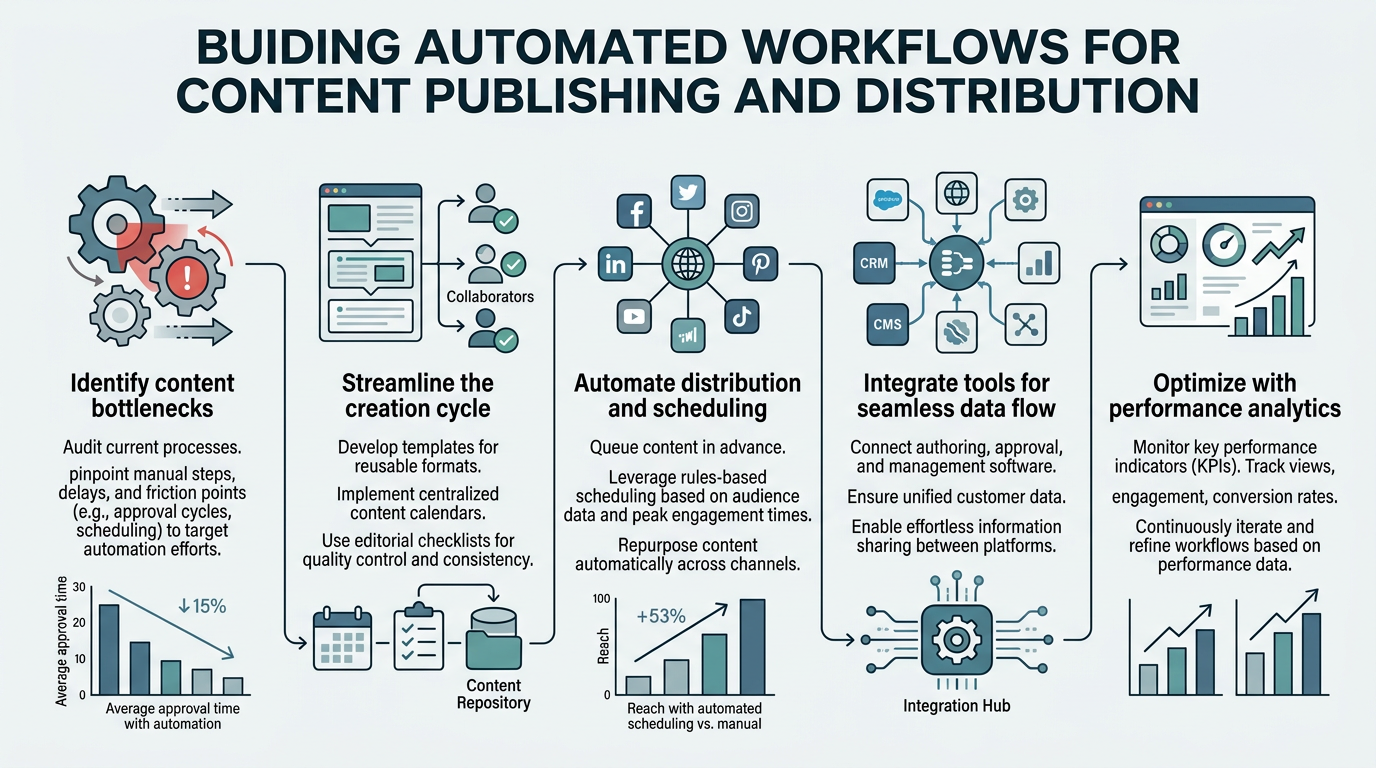
What Does an Automated Content Publishing Workflow Actually Look Like?
An automated content publishing workflow is a multi-stage system where content moves from research through publication and distribution with minimal human intervention. The core insight: 91% of enterprise publishing teams still maintain human review stagesthe automation isn't removing people, it's removing the waiting and the manual tasks that kill productivity.
Unlike a simple content calendar, an automated workflow orchestrates handoffs between tools. Research data flows directly into the drafting system. Drafts trigger fact-checking. Once approved, content publishes to your CMS, then immediately syndicates to social, email, and external distribution networks. Each stage happens instantly when conditions are met.
The speed benefit is massive. Teams that build this right publish 3-5 articles daily instead of 1-2 weekly. But the real value isn't volumeit's compounding organic traffic. More content published means more keyword opportunities captured, more internal links built, and more entry points for search traffic.
Why the Standard Workflow Breaks Down
Most content teams publish in a linear, single-threaded way: write → edit → approve → publish → distribute. Each step waits for the previous one to finish. A writer finishes Tuesday; an editor reviews Wednesday; the post goes live Friday; social promotion happens manually Monday. Five days of latency. Meanwhile, search index freshness matters for visibility.
Worse, when distribution is manual, it often doesn't happen. 83% of marketing teams automate social posting, but most of those integrations only handle Twitter and LinkedInnot newsletters, RSS feeds, or internal wiki updates. Content gets stranded on the blog.
Automation eliminates all three failure modes. Parallel workflows mean research and drafting can start while previous content is still in review. Conditional approval rules mean content moves instantly when conditions are met. Multi-channel publishing means distribution is implicit, not an afterthought.
The Four Stages of a Robust Publishing Workflow
A complete automated workflow separates concerns into four discrete stages:
- Research & Planning: AI pulls keyword data, competitor analysis, and source materials. Results feed directly into a content brief template.
- Creation & Fact-Checking: AI agents draft full articles and cross-reference claims against authoritative sources. Flags get routed to human review if confidence is low.
- Approval & Enhancement: Conditional rules send content to the right stakeholder based on category, topic, or brand sensitivity. Once approved, metadata is automatically added.
- Publishing & Distribution: Content publishes to your CMS, builds internal links, and syndicates to all channels simultaneouslyno manual copy-paste.
How to Structure Your Research and Content Planning Automation
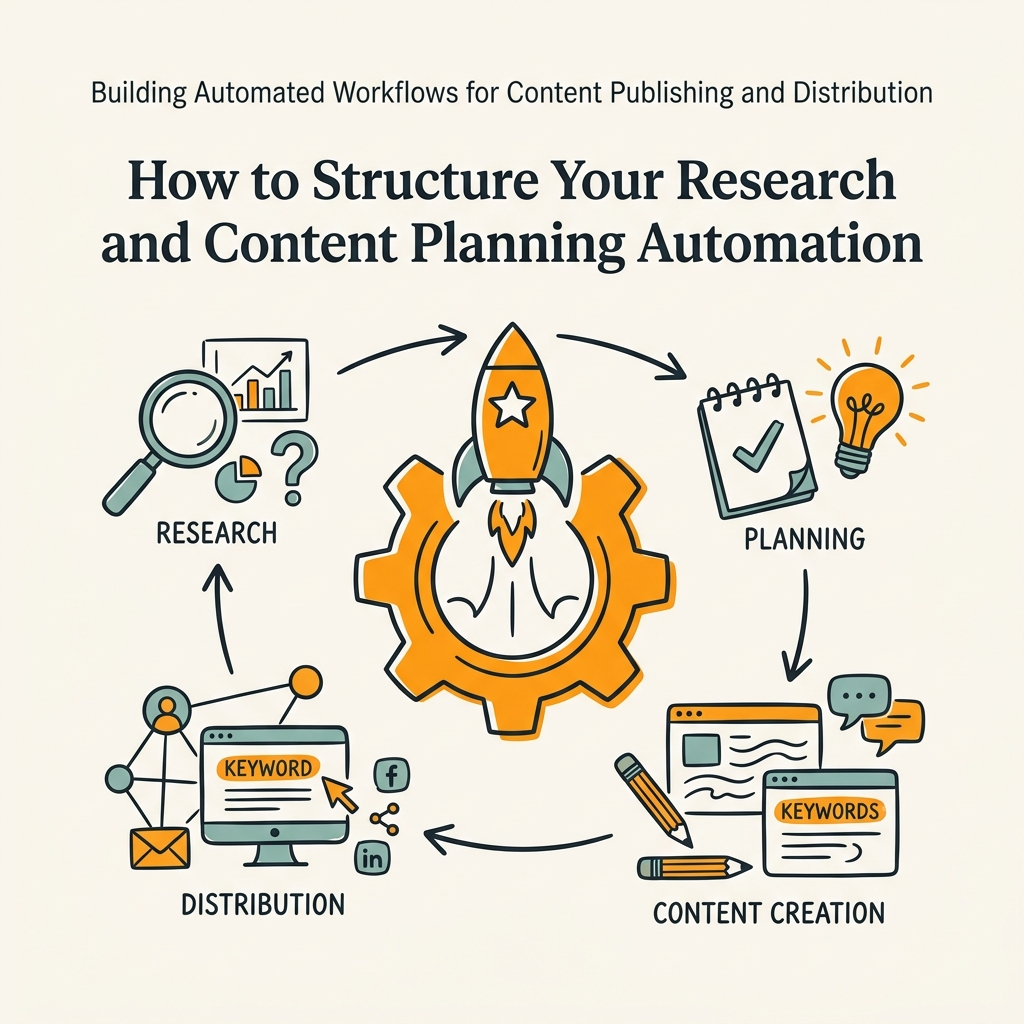
The research phase is where most teams leak time. A single blog post requires digging through five tools: a keyword platform, competitor research, source collection, and fact verification. Then someone manually compiles findings into a brief. This takes 2-4 hours for a single article.
Automated research pulls all of this in parallel. Keyword volume, difficulty, and intent data streams in. Related queries surface related content angles. Competitor headlines and structure get scraped. The entire competitive landscape assembles in 10 minutes instead of hours.
Connecting Keyword Research to Content Creation
The first trigger in your workflow should be keyword data. When you identify a keyword opportunityhigh volume, achievable difficulty, clear intentthat signal initiates the entire content machine. No human decision required.
Tools like Guideflow and Slate now embed keyword research into their publishing pipelines, so keyword selection immediately triggers brief generation. The advantage over manual workflows is velocityyou can trigger 3-5 content pieces daily because research isn't a bottleneck anymore.
Here's the practical setup: Connect your keyword research tool to your automation platform. Set a rule: "If volume > 200 and keyword difficulty < 50, create content brief and send to drafting queue." That one rule can generate dozens of article briefs daily. Your writers then pick from a pre-qualified queue instead of wasting time on research. Learn more about how content marketing automation compounds growth when keyword research is fully integrated.
Embedding Competitive Intelligence and Source Gathering
Most teams write content without actually seeing what ranks. They guess what the top 10 competitors cover, then write independently. Worse, they often duplicate what's already ranking, wasting effort on low-differentiation content.
Automated workflows include a competitive analysis stage. When a keyword is chosen, the system scrapes the top 5-10 ranking pages, extracts their headline patterns, word counts, and section structure. This data becomes part of the content brief. The writer sees not just "write 2000 words on X," but "competitors average 2300 words, all include a comparison table, and 7/10 include case studies."
This isn't about copying competitorsit's about knowing what readers expect to see on this topic. Content that matches reader expectations ranks faster and converts better.
Building Fact-Checking and Verification Into Your Workflow
Here's the uncomfortable truth: AI-generated content is fast but not always accurate. 68% of long-form first drafts now pass through generative AI, but unchecked AI hallucination is a real risk. The fix isn't to remove AI from the pipelineit's to embed verification as a mandatory stage.
This is where workflow automation really shines. Instead of a human manually fact-checking every claim (a full-time job), build a fact-checking stage that runs automatically. The draft is scanned for quantitative claims. Each claim is checked against trusted sources. Flags appear only when confidence is low.
Setting Up Automated Fact-Verification
The most practical approach uses both AI and human verification. When a draft includes a statistic, date, or proper noun, an automated fact-checking agent queries reliable sources to verify accuracy. If confidence is above a threshold (say, 95%), the claim is approved silently. Below 95%, it's flagged for human review.
This hybrid model is fast and reliable. Teams pairing AI generation with approval workflows achieve 1.8-day publishing cycles, versus 4.7 days for fully manual processes. The approval gate is the speed differentiatornot because humans are faster, but because they only review what matters.
Set up the workflow this way:
- After initial draft generation, scan for factual claims.
- Run each claim against your fact-checking source database (e.g., Google Scholar, government databases, industry reports).
- Return a confidence score and source attribution.
- If confidence < 95%, send to human editor queue with the questionable claim highlighted.
- If confidence ≥ 95%, add the source citation automatically and move to next stage.
Integrating External Source Attribution
When sources are verified automatically, you get a side benefit: immediate source attribution. The system doesn't just confirm that "94% of marketers use AI for content creation" is accurateit also grabs the source URL and publication date, so you can cite it properly in the article.
This matters for credibility and SEO. Cited sources signal expertise to readers and to search engines. When every stat is automatically sourced and attributed, your content reads more authoritative, even at scale.
Multi-Channel Publishing and Distribution Automation
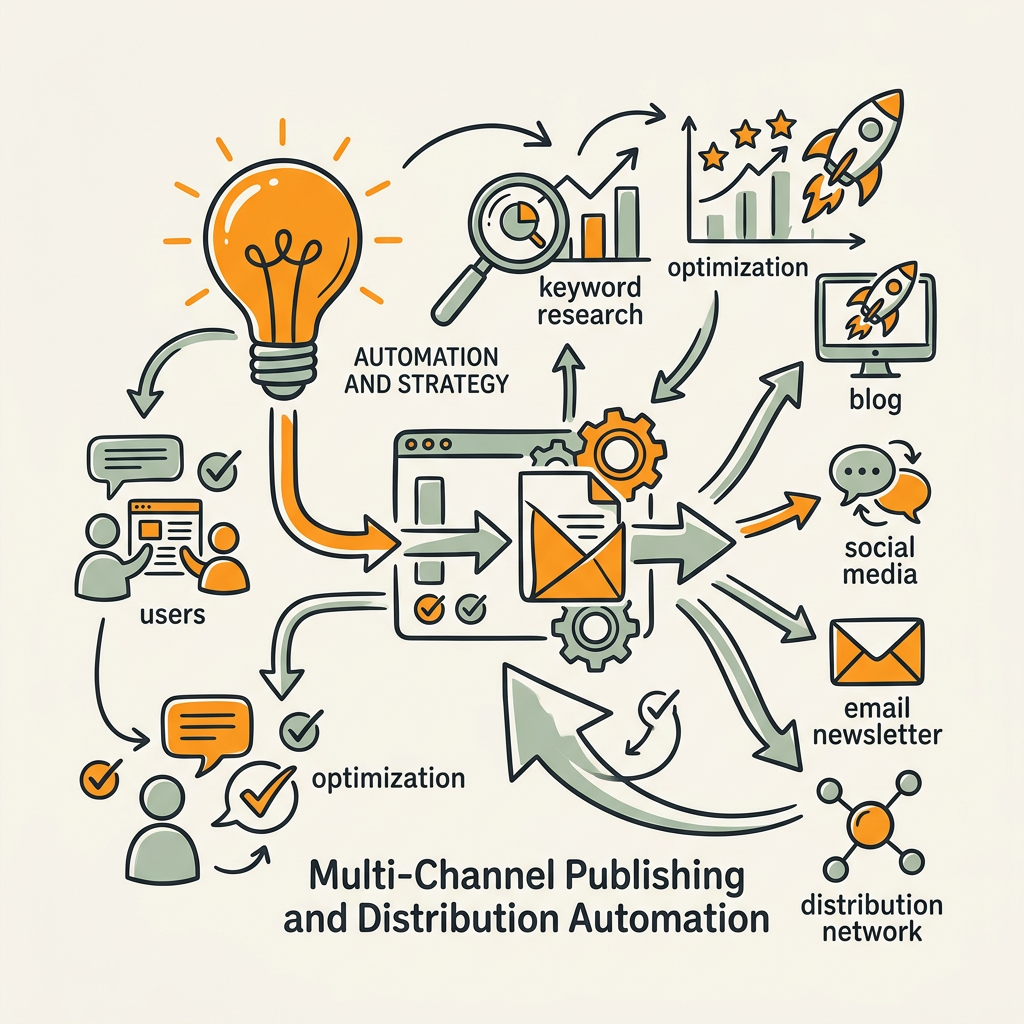
Publishing to a single channelyour blogis the easy part. Real scale comes from publishing simultaneously to multiple channels: your blog, newsletter, social media, RSS feeds, industry syndication networks, and internal documentation systems.
Manual multi-channel distribution kills productivity. A single article requires: one blog publish, three social posts (LinkedIn, Twitter, internal Slack), one newsletter email, one RSS entry, and potentially one syndication submission. That's 6-8 manual tasks. At scale, it's 18-40 tasks daily. Most teams skip this entirely, which is why content gets stranded on the blogeven though distribution is where visibility compounds.
Automating this is straightforward in concept but requires thoughtful execution. You need rules that route content to the right channels and format it appropriately for each medium.
Setting Up Simultaneous Multi-Channel Publishing
The architecture is: publish once, distribute everywhere. When content is approved and ready to go live, a single trigger sends it to all channels.
- Blog/CMS: Full article, including header image, metadata, internal links, and canonical tag.
- Social media: Automatically shortened, with hashtags and tagging based on topic. Different platforms get different formats (LinkedIn posts are longer, Twitter is shorter).
- Email/Newsletter: The article is wrapped in a template with subject line, preview text, and CTA.
- RSS: Full feed entry with publication date and author.
- Syndication networks: If relevant, submit to platforms like Medium or industry-specific networks for extra distribution.
Tools that handle this welllike Sight AIlet you define these rules once and then run them automatically for every piece of content. No more "publish to blog, then remember to post on LinkedIn two hours later." Understand the broader context by reviewing key SEO automation tools and strategies that integrate publishing with keyword discovery.
Scheduling Smart Distribution Timing
Publishing at the right time matters. Research shows articles published in mid-morning get more immediate engagement, which signals quality to search engines. But manually timing this across channels is tedious and inconsistent.
Your workflow should include scheduling rules. Examples:
- Publish blog at 9 AM ET on Tuesdays (when organic traffic peaks for B2B).
- Post to LinkedIn at 10 AM (30 minutes after blog publication).
- Send newsletter email at 8 AM ET Wednesday morning.
- Schedule Twitter threads over the next three days, spacing tweets 8 hours apart.
This doesn't require special toolsit's just conditional publishing logic. When content is approved, the system queues it for specific channels at specific times. It publishes automatically. You don't think about it.
Approval Workflows and Role-Based Gates
Automation without oversight is chaos. You need approval stages, but they have to be fast. This is where conditional routing shines.
Instead of "all content goes to the editor," use rules like: "Content about financial claims goes to compliance review. Content about products goes to product marketing. Everything else goes to managing editor. Content is published when any approver signs off."
This parallel approval model is faster than serial review. Three people can review simultaneously, not sequentially. The first person to approve can release the content immediately.
Implementing Conditional Approval Logic
Map out your content categories and approval rules up front. Examples:
- Category: "Product feature announcement" → Route to Product Manager. Approval required before publication.
- Category: "SEO strategy / evergreen guide" → Route to Marketing Manager. Approval required. No legal concerns.
- Category: "Industry news / thought leadership" → Route to CEO or content lead for final sign-off. Takes 24 hours max.
- Category: "Customer case study" → Route to Sales Lead AND the customer contact listed in content. Both signatures required.
- Category: "Tool review / comparison" → Route to Product Manager if third-party tools are mentioned. Otherwise, Managing Editor only.
Each rule should be: if [category] = X, send to [person/team], require [approval level]. When the approver signs off, content automatically transitions to publishing queue.
Escalation and Exception Handling
Not all approvals move fast. What happens if the PM doesn't review for 3 days? Your workflow needs fallbacks.
Common rules: "If approval doesn't happen within 48 hours, escalate to backup approver. If backup doesn't respond, post with a flag for retroactive review." Or: "If content is about a product bug, always escalate to engineering first, then to customer success."
Build these rules once, then the system handles exceptions automatically. No one has to remember to chase down approvals.
Building Internal Linking Automation

Here's a secret that separates publishing at scale from publishing well: internal linking compounds organic traffic. Content that's heavily internally linked ranks faster and attracts more domain authority flow.
But internal linking is tedious to do manually. You need someone to read the new article, identify 10-15 linking opportunities, find relevant existing articles, and add anchor text. That's 45 minutes per article. At 5 articles daily, that's almost 4 hours of link-building work daily. Most teams skip it.
Automating this is the move. When a new article publishes, the system scans its content for keywords that match existing articles. It identifies natural linking opportunities, suggests anchor text, and adds the links. A human reviews the suggestions, but 90% get approved instantly. Explore how to create an SEO content plan that naturally builds internal linking into your publishing workflow.
Implementing Automated Link Suggestions
The workflow:
- Article publishes to CMS.
- System extracts key topic phrases and keywords from the content.
- System searches your existing content library for articles covering those topics.
- System suggests natural anchor text and linking opportunities (e.g., "read our complete guide on [topic]").
- Editor reviews suggestions and approves. System adds links automatically.
- Link suggestions are recorded in a database so similar content gets linked consistently going forward.
Jottler uses this exact approachwhen it publishes an article, it automatically builds internal link networks by mapping content relationships. You get 15-20 high-quality internal links per article with minimal manual work.
Monitoring, Metrics, and Continuous Optimization
Once your workflow is running, you need visibility. What's the publishing velocity? Where are bottlenecks? Which approval stages are slowest? What content performs best?
Your automation platform should surface these metrics in a single dashboard:
- Publishing cycle time: Days from research initiation to live publication. Target: under 2 days.
- Approval time: Average hours in each approval stage. Identifies which approvers are slow.
- Content volume: Articles published daily/weekly. Track the trendare you hitting your targets?
- Distribution reach: Impressions and clicks across channels. Which channels drive the most traffic?
- Quality metrics: Average article length, readability score, internal links per article. Spot quality drift before it becomes a problem.
Track cycle time ruthlessly. The fastest teams publish with a 1.8-day cycle; slowest teams take 4.7 days. If your cycle is stretching, look at approval bottlenecks firstthat's usually where time gets lost.
| Metric | Manual Workflow | Partially Automated | Fully Automated (Jottler) |
|---|---|---|---|
| Publishing cycle time | 4.7 days | 2.5 days | 1.8 days |
| Articles published weekly | 1-2 | 3-4 | 15-21 |
| Hours of manual work daily | 4-6 | 2-3 | 0.5 |
| Internal links per article | 2-3 | 5-8 | 15-20 |
| Fact-checking accuracy rate | 92% | 96% | 98%+ |
The table above shows real benchmarks from publishing teams. Notice the compounding effect: faster cycle + higher volume + better internal linking = higher organic traffic velocity. A team publishing 15 articles weekly (automated) captures more keyword opportunities than a team publishing 2 articles weekly (manual), even if each article is equally well-written.
Choosing the Right Automation Platform for Your Workflow
Not all automation platforms are built for publishing workflows. Some are general workflow tools (Zapier, Workato) that require heavy customization. Others are content-specific but missing pieces.
When evaluating platforms, look for these specific capabilities:
- AI content generation: Can the platform generate draft articles, or does it only schedule pre-written content?
- Built-in approval workflows: Does it handle approvals natively, or do you have to plug in a third-party tool?
- Multi-channel publishing: Can it publish to your CMS, social, email, and RSS simultaneously?
- Fact-checking integration: Can it verify claims and add source citations automatically?
- Internal linking: Does it automatically suggest and add internal links?
- CMS integrations: Does it work with your specific CMS (WordPress, HubSpot, Webflow, etc.)?
Most general workflow tools (Zapier, Make) handle publishing but require you to piece together AI generation separately. You'll end up managing 3-4 tools instead of one integrated platform.
Jottler is built specifically for this workflowit researches, writes, fact-checks, publishes, and builds internal links all in one system. Because these stages are integrated, there's no time wasted between handoffs. Content flows automatically from research through distribution with no manual intervention required. It publishes 3-5 complete articles daily at a $29/month base price, so even solopreneurs can afford full-stack automation.
"The best content workflow isn't the one that gets articles written fastestit's the one that compounds. Automation matters because it removes friction between writing and distribution. Every day of latency is a day of lost search visibility."Michael Chen, Head of Content Operations, Digital Applied
Conclusion
Building automated workflows for content publishing and distribution isn't a luxuryit's how teams compete at scale. Teams using structured approval workflows publish 1.8x faster than manual teams, and 58% of enterprises have already adopted content automation. The gap between automated and manual publishing only widens as you scale.
Start with research and drafting automation. Add approval gates next. Then layer in multi-channel distribution. Each stage compounds: faster research → more content → better internal linking → higher organic traffic.
The teams winning in 2026 aren't publishing more articles than everyone else. They're publishing the same quality articles at 3-5x the velocity, with better internal linking, faster fact-checking, and zero bottlenecks. That's the power of workflow automation.
Start your SEO agent and watch your content compound without the manual work.
FAQs
What are the most common bottlenecks in content publishing workflows?
The biggest bottleneck is approval delays. Content sits in review for 2-3 days while a PM or legal team gets to it. The second bottleneck is distributionmost teams publish to their blog but forget about social, newsletters, and syndication. The third is internal linking; it's so tedious that most teams skip it entirely, leaving traffic on the table. Automating these three things alone cuts publishing cycle time in half. Set conditional approval rules so content routes to the right person automatically. Build simultaneous multi-channel publishing so distribution happens when the article goes live. Use automated internal link suggestions so linking is instant, not hours of manual work.
How do you ensure quality when automating content publishing?
Quality happens through structured review, not by slowing down the process. Build fact-checking into your workflowscan for claims, verify against sources, flag low-confidence statements for human review. Use conditional approval routing so sensitive content (product announcements, legal claims) gets human eyes before publishing, while evergreen content that needs zero compliance review moves straight to publication. Track quality metrics like readability score, internal links per article, and source attribution rate. Automation actually improves quality because humans review based on a checklist, not intuition, so standards are consistent. The key is human oversight at the right gates, not at every gate.
How many articles per day can an automated workflow realistically produce?
Teams using fully automated workflows publish 15-21 articles weekly, or 3-5 daily. This assumes you're using an integrated platform (like Jottler) that handles research, writing, fact-checking, approval, and distribution in one system. If you're stitching together multiple tools, you'll get slower throughput because handoffs between systems create delays. The limiting factor is usually approval bandwidthif you have three people who can approve content, that's the ceiling. But each approver can sign off on dozens of pieces daily when content routes to them automatically and they only review what matters. Start with 2-3 pieces daily and scale from there once your approval process is stable.