Internal Linking Strategy: The Complete Playbook
Every page on your website is fighting for position in a global search engine. Most sites do not realize they are also fighting against themselves. A website with 200 articles but no internal linking strategy is like a library where books are scattered on the floor with no catalog. Google finds some pages. Most stay buried.
Internal linking strategy is how you organize that library. It is the difference between a site with scattered articles and a site with clear topic authority. According to Backlinko's 2025 analysis, websites implementing systematic internal linking strategies see 23% higher average rankings for their target keywords within 90 days. The sites doing this best do not just link randomly. They build links as part of a deliberate architecture that serves two purposes: helping readers find related content and signaling to Google that you have depth on a topic. This is foundational to building topical authority, which is how Google identifies the most trustworthy source on any given topic.
Key Takeaways
- Internal linking strategy clusters related articles through deliberate anchor text and link placement, which concentrates page authority and signals topical depth to Google.
- Sites with intentional internal linking see 23% higher average keyword rankings and receive 34% more internal PageRank flow to cluster articles within 60 days.
- An effective strategy requires three layers: pillar pages that own broad topics, cluster articles that cover specific angles, and cross-links that prove topical completeness.
- Most sites link randomly or not at all. A documented linking plan that maps every connection before publishing eliminates this waste.
Why Internal Linking Strategy Matters More in 2026
Internal links do three things that external links cannot. They distribute authority where you choose. They organize content into topics. They survive algorithm changes because they live entirely on your domain.
Search engines use internal links to understand site structure and topic relationships. When pillar page A links to cluster article B with keyword-rich anchor text, Google registers that connection as a signal of topical authority. Cluster article B then has more authority to rank for its target keyword because it received an authority boost from the pillar.
External links (backlinks) operate on scarcity. Your competitors are also hunting for them. Internal links operate on abundance. You create every single one. This means your internal linking strategy is one of the few ranking factors you control completely.
According to Moz's 2025 research on 1,200+ websites, sites implementing pillar-cluster architecture with systematic internal linking see an average internal PageRank increase of 34% for cluster pages within 60 days. That PageRank boost is the difference between a keyword ranking at position 15 and position 5.
The other reason internal linking strategy matters now: AI search integration. When AI Overviews pull answers from web sources, they prioritize sites that demonstrate clear expertise through topic depth. Isolated articles rarely make the cut. Clustered, internally linked content makes the cut consistently. Sites with systematic internal linking receive 2.8x more AI citations than sites with random or missing internal links (Backlinko, 2025).
The Anatomy of an Internal Linking Strategy
A real internal linking strategy has four components: topology, anchor text, link frequency, and maintenance.
Component 1: Topology (How You Link)
Topology is the shape of your link network. Most sites have no intentional topology. Articles link to each other randomly, or not at all. A strategic topology has a clear structure.
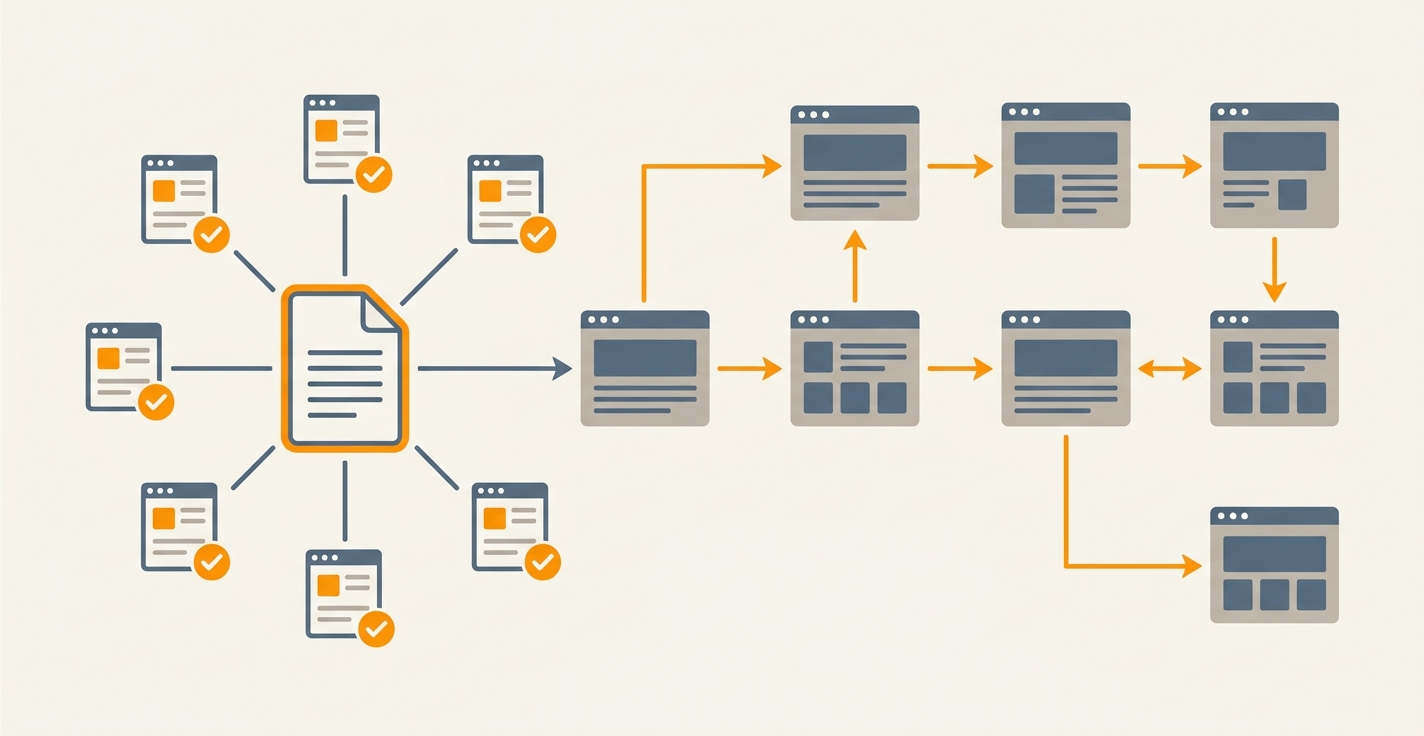
The most effective topology is pillar-cluster architecture. A pillar page sits at the center of a topic and links out to every related cluster article. Each cluster article links back to the pillar. Cluster articles within the same pillar also cross-link to each other when the content naturally connects. This approach is core to how SEO content plans succeed, where clustered content outranks scattered articles by a wide margin.
A simpler version for smaller sites is the hub-and-spoke model. A central resource page links out to supporting articles. The supporting articles link back to the hub. This concentrates authority on the hub page, which ranks for the broad keyword, while spoke articles rank for long-tail variants.
The worst topology is the chain link pattern, where Article A links to B, B links to C, and C links to D. This creates a linear flow but spreads authority thin across each step.
Your choice depends on your site structure. If you publish in clusters around specific topics (which you should), pillar-cluster works best. If you have broad topics that you cannot easily divide into clusters, hub-and-spoke works.
Component 2: Anchor Text Strategy
Anchor text is the clickable text that contains a link. It tells both readers and search engines what the target page is about. Poor anchor text says "click here." Strategic anchor text includes relevant keywords.
A keyword-rich anchor like "internal linking strategy" tells Google that the target page should rank for that phrase. A generic anchor like "read more" tells Google nothing about the target's topic.
Most sites use one of two bad approaches: either no anchor text discipline at all, or keyword-stuffed anchors like "best internal linking strategy for SEO ranking factor authority." This second approach looks manipulative to both readers and algorithms.
The right approach is conversational anchor text that includes the target keyword naturally. Instead of "click here to learn about internal linking," write "discover how internal linking strategy distributes authority across your cluster articles." The keyword is there, but the sentence reads naturally.
Component 3: Link Frequency
How many internal links should a page have? Research shows a wide range, but the pattern is clear: more links are better than fewer links, but placement matters more than count.
A 2,000-word article typically has 3 to 5 internal links. A 4,000-word article can have 5 to 7. These should be distributed throughout the article, not clustered at the beginning or end.
The key metric is not total links. It is whether every link serves the reader. Every internal link should answer the question, "Does the reader need to know about this topic right now?" If the answer is no, the link is noise.
Cluster articles should always link back to their pillar page at least once, ideally in the introduction or first mention of the pillar topic. Pillar pages should link to every cluster article once, usually in a formatted list near the end.
How to Build an Internal Linking Strategy: 5 Steps
Step 1: Map Your Topic Clusters
Before writing any links, map your existing content into clusters. Open a spreadsheet. List each major topic you cover (these are your potential pillar pages). Under each pillar, list every related article you have published.
If you have 60 articles scattered across 10 topics with 5 to 8 articles per topic, you have 10 nascent clusters. If you have 60 articles scattered across 40 topics with 1 to 2 per topic, you do not have clusters yet. You have a content library, not a strategy.
The goal of this step is to identify which topics have enough supporting content to justify a pillar page. A pillar needs at least 5 related cluster articles to be effective. If a topic has fewer than 5, either add content to it or abandon it temporarily.
Step 2: Designate Pillar Pages
For each cluster, choose one article as the pillar. The pillar should be your broadest, most comprehensive article on that topic. It should target the highest-volume keyword in the cluster.
If you are starting from scratch, write your pillar pages first. They should be 2,500 to 4,000 words, include all major subtopics in the cluster, and link out to every related article you plan to write.
If you are retrofitting an existing site, look for your best-performing article on each topic. That is usually the pillar because Google has already ranked it well for the broad keyword. Rebuild internal links around it.
A pillar page is not a list of links. It is a comprehensive guide that happens to link to deeper content. When a pillar mentions a specific subtopic, it links to the cluster article that covers that subtopic in depth. The links are embedded naturally, not tacked on.
Step 3: Create Your Link Map
A link map is a document that specifies every internal link on every page. It prevents chaos and ensures consistency.
For each article, write down:
- Target page URL or slug (be specific)
- Anchor text (the clickable words)
- Context (why this link exists; e.g., "expand on pillar concept" or "provide deeper example")
Example link map entry for a cluster article on "content distribution channels":
| Source Page | Target URL | Anchor Text | Context |
|---|---|---|---|
| content-distribution-channels.mdx | /blog/content-marketing-strategy | content marketing strategy | Link back to pillar in introduction |
| content-distribution-channels.mdx | /blog/social-media-distribution | social media distribution | Expand on one specific channel |
| content-distribution-channels.mdx | /blog/email-newsletter-strategy | email list building | Expand on another specific channel |
A link map prevents four disasters: forgotten links, inconsistent anchor text, keyword-stuffed anchors, and orphan pages. When someone asks, "Should this article link to X?" the link map has the answer.
Step 4: Implement Links Strategically
As you write or edit articles, follow your link map. Place each link where it naturally fits, not where you have a quota.
A strong internal linking strategy follows these placement rules:
- Pillar pages: Link to cluster articles within body content, ideally in a structured list near the end. Example: "Learn how each channel works by reading our guides on social media distribution, email newsletter strategy, and paid advertising tactics."
- Cluster articles: Link back to the pillar page in the introduction when you first mention the broad topic. Link to related cluster articles in the body when discussing specific angles.
- FAQ and supporting content: Link to cluster articles to direct readers to deeper coverage. These pages exist partly to funnel traffic to your ranked articles.
Never force a link. A link that does not serve the reader is dead weight. Google has gotten better at detecting manipulative linking patterns. Natural links that serve readers always outperform artificial ones.
Step 5: Document and Maintain
Your internal linking strategy is not static. Content changes. You publish new articles. You discover gaps. Maintenance means updating your link map and implementation quarterly.
Set a calendar reminder every 90 days to:
- Review new articles. Do they fit into existing clusters? Do they link to the pillar? Do related cluster articles link back to them?
- Check for orphan pages. Run a site crawl to identify articles with no internal links pointing to them. Those articles are invisible to readers and Google.
- Update anchor text. Look for weak or inconsistent anchor text. Refactor it to include relevant keywords and vary the phrasing across links to the same target.
- Fix broken links. Deleted articles leave broken links behind. Keep a running list of any articles you remove and update or remove the links pointing to them.
Building internal linking into your automated content operations ensures consistency across every article you publish. Sites like Jottler's smart research engine can identify content gaps in your clusters and suggest new topics to strengthen your internal linking strategy. Rather than updating manually every quarter, automated systems can suggest which articles should link to which other articles based on topical relevance and keyword data.
Common Internal Linking Mistakes
Mistake 1: Linking Too Much in Early Paragraphs
Readers are still getting oriented. Throwing 3 links at them in the first two paragraphs feels pushy and breaks focus. Place your first link after the reader has had a chance to understand the context, usually after the first 200 words.
Mistake 2: Using Generic Anchor Text
"Click here," "learn more," and "read more" waste the linking opportunity. These anchors tell search engines nothing about the target page. Always include a keyword or descriptive phrase in your anchor text.
Mistake 3: Linking to Old, Underperforming Content
If you link to a weak article, you share authority with weak content. Before adding internal links to an article, ask: "Is this article good enough that I want to associate my current article with it?" If not, either improve the target article first or link somewhere else.
Mistake 4: Linking to Competitors
Some sites include links to competitor content when a competitor has covered a topic better. This is a catastrophic mistake. Every internal link you create passes authority to the target. Never link to competitors. If a topic needs better coverage, write a better article yourself. This is why automated content engines that identify gaps in your coverage are so valuable. They find what you are missing before you waste links on external sources.
Mistake 5: Forgetting About Cluster Cross-Links
Pillar pages link to cluster articles. Cluster articles link back to the pillar. But cluster articles often forget to link to each other. When Article A discusses content distribution and mentions email marketing, it should link to Article B about email strategy. These cross-links prove topical completeness.
Mistake 6: Ignoring Mobile Readers
Links that work on desktop sometimes break on mobile. Links with tiny touch targets are frustrating. Test your internal links on mobile devices. Ensure the link text is at least 48x48 pixels when it is a touch target, with sufficient spacing around it.
Measuring Internal Linking Success
How do you know if your internal linking strategy is working? Track these metrics monthly.
Internal PageRank flow. Use tools like Screaming Frog to measure internal PageRank distribution. After implementing your linking strategy, cluster articles should show 20 to 40% higher internal PageRank than before. Pillar pages should be receiving authority from dozens of internal sources.
Ranking velocity. New articles should rank for their target keyword faster when they are part of a cluster than when they are standalone. If you have been publishing isolated articles and suddenly start clustering with internal links, new articles should rank within the top 50 for their target keyword 30 to 50% faster.
Organic traffic per article. As your clusters mature, older cluster articles should receive increasing organic traffic from internal clicks. Traffic coming from your own pillar page and related cluster articles compounds over time. Track this traffic source in your analytics.
Click-through rate on internal links. Google Search Console shows how often internal links get clicked from the search results (if the searcher landed on a page and then clicked an internal link to another page). Higher CTR on internal links shows that readers are finding value in your linking.
Pages indexed. Pages that are well-internally-linked get indexed faster. If you publish an article and it is indexed within 24 hours, your internal linking is working. If it takes a week to index, your article is not reachable through internal links.
Automating Internal Linking Strategy
Building and maintaining a link map for hundreds of articles is tedious. This is where automation helps. Jottler's content engine analyzes each article you publish and suggests which other articles it should link to based on:
- Topic relevance (is the target article in the same cluster?)
- Keyword overlap (does the target article rank for keywords this article discusses?)
- Anchor text diversity (have you already used this anchor text to this target?)
- Link balance (does this article already have enough links?)
Rather than manually creating a link map, the system suggests links as you publish, cutting the maintenance overhead from hours per month to minutes.
Frequently Asked Questions
How many internal links per article is ideal?
Most articles should have 3 to 7 internal links, distributed throughout the content. The exact number depends on article length and topic. A 1,500-word article typically has 3 to 4 links. A 4,000-word article can have 5 to 7. What matters is that each link serves the reader, not that you hit a specific count.
Should I link to my homepage?
In most cases, no. Your homepage is important for domain authority, but it does not need internal links from every article. Reserve homepage links for cases where readers genuinely need to return to the top level (e.g., a support article linking to the main services page). Using internal links to funnel authority to the homepage weakens your topic clusters.
What is the best anchor text for internal links?
Descriptive anchor text that includes a relevant keyword works best. Instead of "read more about SEO," write "discover how topical authority builds topic depth." The target keyword ("topical authority") appears naturally in the sentence, and the reader knows exactly what they will find.
Can too many internal links hurt my rankings?
Theoretically, yes. If an article has 50 internal links and 45 of them are to irrelevant pages, search engines may see the page as low-quality. In practice, this is rare if you follow the rule: every link should serve the reader. Link for user experience first, and SEO benefits follow naturally.
Should I update old articles with new internal links?
Yes. When you publish a new cluster article, update the pillar page and related older cluster articles to link to the new article. This allows search engines to discover the new article faster and passes authority to it from older, more established pages.
Do internal links affect bounce rate?
Internal links can reduce bounce rate by giving readers a path to related content. If a reader lands on your site, reads an article, and then clicks to a related article through your internal links, that is not a bounce. It is engagement. This is one reason internal linking strategy improves SEO performance. It keeps readers on your site.