Template and Workflow Features That Save Hours Weekly
Your content team is drowning in repetitive work. Teams spend an average of 8–14 hours per article on tasks that don't move the strategy forward: formatting, scheduling, cross-posting, internal linking, and fact-checking. The real cost? A solo marketer at a growing company wastes 30–40 hours weekly on execution that could be automated. Meanwhile, your organic traffic stalls because nobody has time to publish the volume required to compound growth.
The fix isn't hiring more people. It's building workflows and templates that execute without constant oversight.
Key Takeaways
- Workflow automation reduces repetitive tasks by 60–90%, with teams saving 6–14 hours per week on content execution alone (2026, Formstack).
- Templates embedded in your publishing pipeline eliminate handoffs — research, writing, linking, and publishing happen in sequence without manual intervention.
- Organizations using workflow automation achieve 200% ROI within the first year, primarily through time recovery and error reduction (2025, Industry Data).
- AI-driven templates now handle content repurposing in minutes instead of hours, unlocking multi-channel distribution without the busy work.
- Template Fundamentals: Pre-built workflows that standardize your content process and eliminate decision fatigue on repetitive steps.
- Workflow Automation for Content: Systems that handle research, outline generation, drafting, and fact-checking without human intervention between steps.
- Publishing Automation: Templates that format, schedule, and cross-post content across channels while maintaining brand consistency.
- Scaling Without Adding Headcount: Autonomous systems that compound output without proportional increases in team size or hours.
- Integration and Handoff Management: Workflows that connect your CMS, email platform, and analytics so no manual work drops between tools.
What Makes a Workflow Template Actually Save Time?
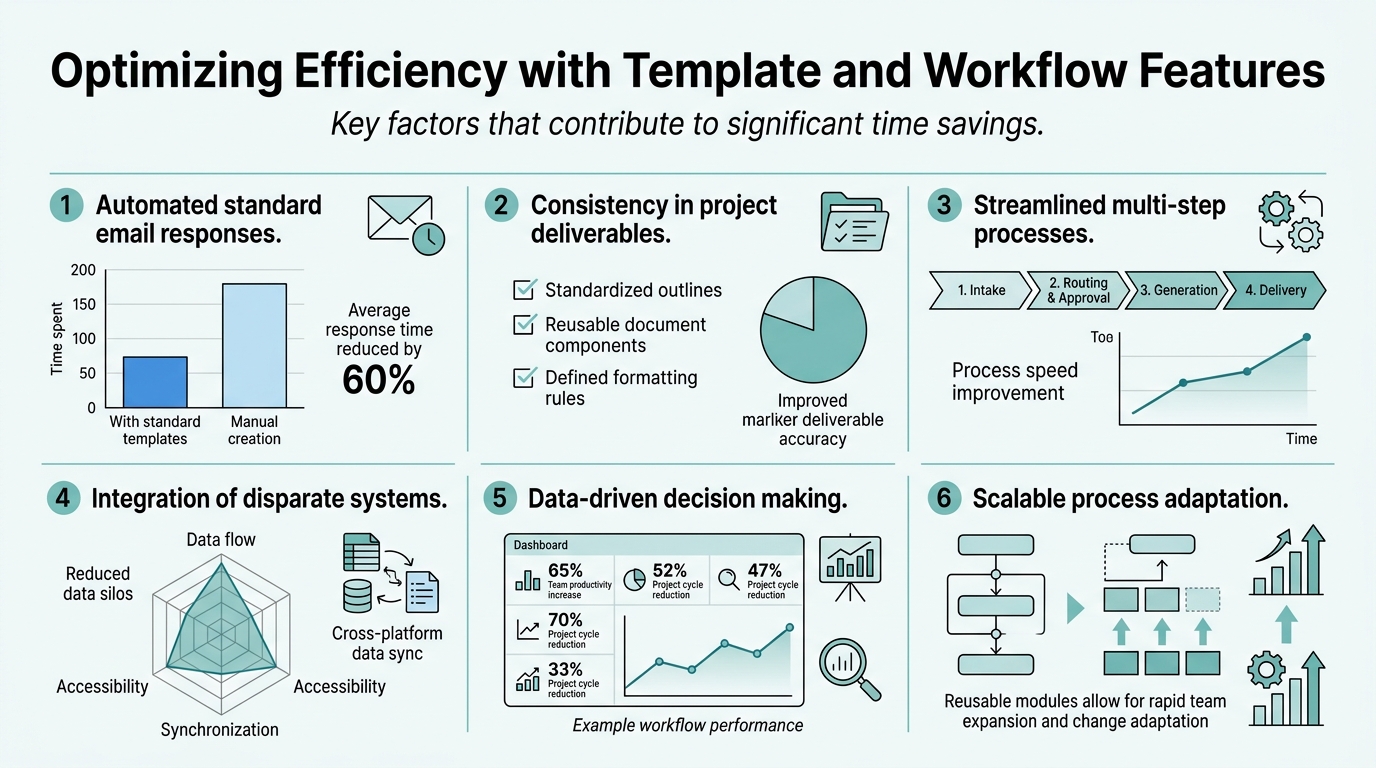
Most workflow templates fail because they live in a spreadsheet or Notion document, separate from the actual work. Your team looks at the template, improvises around it, and skips steps when deadlines hit. That's not laziness — it's friction. The fix is embedding the template into the tool where work happens, with clear triggers, ownership, and automated handoffs.
The Three Core Elements That Make Templates Stick
Automation removes friction at each handoff. Instead of one person finishing their part and manually passing it to the next, the system passes it forward automatically. When content drafts hit a word count threshold, they auto-route to review. When review is approved, the post automatically publishes and generates internal links. One study found that agencies cutting automation into their marketing operations saw coordination time drop from 60–80 hours per week to 10–15 hours — a 75–85% reduction in operational overhead.
"The templates that work allow teams to skip non-critical steps for time-sensitive content while preserving the core process. A blog post for breaking news might skip one research step; a comprehensive guide keeps all of them."
Clear ownership and rules prevent bottlenecks. A template that doesn't specify who approves at each stage becomes a stalled project. The best templates assign owners, set SLAs, and escalate exceptions. If review takes more than 24 hours, it automatically escalates to leadership. If a piece fails fact-checking, it routes back to the writer with specific feedback, not back to the queue.
Flexibility within structure lets teams adapt without breaking the process. A rigid template that forces teams to follow a checklist verbatim gets ignored. The templates that work allow teams to skip non-critical steps for time-sensitive content while preserving the core process. A blog post for breaking news might skip one research step; a comprehensive guide keeps all of them. The system should enforce structure but permit exemptions with documentation.
Real Metrics: What Templates Recover Per Week
Content teams using template-driven automation report 6–10 hours saved per week on scheduling, cross-posting, and reporting alone. For teams publishing four pieces monthly, that's 32–56 hours saved monthly — or 2–3.5 hours per person per week across a three-person team. When automation also includes content outline generation and initial drafting, the figure climbs to 8–14 hours per piece.
The biggest wins come from multi-workflow automation. If your templates cover research briefing, content production, approval routing, and publishing distribution, teams report saving 20+ hours per week on average. The model is compound: one automated workflow saves 3 hours. Five interconnected templates save 20+ because handoffs disappear and exceptions are handled by rules, not people.
Why Simple Checklists Don't Work
A Notion template with a checklist ("Research topic, write outline, draft post, review, schedule, publish") gets ignored under deadline pressure. It requires active thinking at each step. A workflow template, by contrast, automates the thinking. The system knows that after you submit research notes, the outline generation starts. It knows that after outline approval, draft generation begins. You don't need to remember the next step — the system nudges you forward.
How Workflow Automation Compounds Your Content Output

Content marketing's core problem isn't quality — it's consistency and volume. One article per month won't move the SEO needle. You need to publish regularly, build topical authority, and layer internal links across a growing site. Workflow automation is the only way a small team publishes at the frequency required for organic growth to compound.
Removing the Bottleneck: From 1-2 Articles Per Month to Daily Publishing
A solo marketer publishing one article every two weeks might spend 6–8 hours per piece researching, writing, and publishing manually. Scale that to two pieces per week and suddenly it's consuming 70+ hours monthly. You can't hire your way out; it's cost-prohibitive for growing startups. Instead, you eliminate the manual steps.
"A founder who previously spent 8 hours per article now spends 20 minutes reviewing and approving — the difference between a sustainable content operation and burnout."
Autonomous AI systems like Jottler's autonomous SEO agents handle the research-to-publishing workflow without human intervention between steps. The system researches multiple angles from 14+ sources, fact-checks claims in real time, generates a comprehensive outline, writes the full article, formats it for SEO, and publishes directly to your CMS — all while building internal links to existing content. A founder who previously spent 8 hours per article now spends 20 minutes reviewing and approving.
Template-Driven Workflow for Content Repurposing
Repurposing is where templates unlock the biggest time gains. One comprehensive blog post can become a LinkedIn carousel, Twitter thread, email series, and short-form video script. Manual repurposing takes 2–3 hours per post. With a template-driven workflow, that same work completes in 15–20 minutes.
The workflow looks like this:
- Blog post publishes and auto-triggers a "content repurposing" workflow.
- AI extracts key takeaways, statistics, and narrative threads automatically.
- Secondary templates generate 3–5 repurposed formats simultaneously.
- Posts route to a staging queue for final review (brand voice, links, calls-to-action).
- Upon approval, pieces auto-schedule across channels with optimal timing and platform-specific formatting.
One template handles it end-to-end. A busy founder doesn't manually create five versions of the same content; the system does, and they review the final outputs.
Integration: Where Templates Save Their Biggest Hours
Most tools don't talk to each other. Your CMS is separate from your email platform, which is separate from your analytics, which is separate from your scheduling tool. Every handoff between tools requires someone to copy-paste, reformat, or manually log data. Over a month, that's 8–12 hours of pure busywork.
Smart workflow templates eliminate these handoffs through integration. Your content management system connects to your email platform, which connects to your social scheduler, which connects to your analytics dashboard. When you publish a post, the workflow automatically:
- Generates email subject lines and scheduling options.
- Formats the post for social sharing with platform-specific dimensions.
- Adds internal links to semantically relevant existing content.
- Logs the publish event to your analytics system.
- Routes a summary to stakeholders for visibility.
Without integration, you'd do each of these manually. With templates and API connections, they happen automatically and in parallel. The result: what once took 4 hours now takes 15 minutes. This is one reason why teams using SEO automation platforms scale their content production faster than competitors still doing manual work.
Building and Deploying Workflow Templates That Teams Actually Use
Workflow adoption is the real challenge. A template that doesn't account for how your team actually works gets abandoned. The best templates are built around three principles: minimal friction, clear value, and flexibility within structure.
Step 1: Audit Your Current Workflow and Map Time Sinks
Before you build a template, measure your baseline. Spend one week tracking how long each content task actually takes: research, outline review, drafting, fact-checking, formatting, scheduling, and publishing. Where do you lose the most time? Most teams lose 3–4 hours per piece just on formatting and scheduling. Start there.
Document not just time but also decision points. Where does work get stuck waiting for approval? Where do people improvise and skip steps? Those friction points are where templates create the most value.
Step 2: Define Your Core Workflow in Three Phases
Simplify first. Your workflow template should have no more than three main phases:
- Planning & Research: Topic selection, competitive analysis, keyword research, outline approval.
- Production & Review: Draft generation, fact-checking, SEO optimization, editorial review, internal linking.
- Publishing & Distribution: Final formatting, CMS publishing, social scheduling, email setup, performance tracking.
Each phase has clear entry and exit criteria. The template doesn't hand off until the exit criteria are met. This prevents rework and keeps content moving.
Step 3: Assign Owners and Set Decision Rules
Who approves the outline? Who fact-checks claims? Who approves the final post? Who schedules the email? Ambiguity kills workflows. The template should specify an owner for each gate, along with a rule-based escalation if they don't respond within 24 hours.
The most successful teams build in conditional logic: if a post is evergreen content, it goes through full fact-checking. If it's a news hook with a 6-hour deadline, fact-checking is abbreviated but final review is mandatory. The template allows flexibility but preserves quality gates.
Step 4: Measure and Iterate
Track cycle time for each phase. How long does a piece spend in research? In review? In scheduling? Where do pieces get stuck most often? After one month, you'll see patterns. Adjust the template: maybe review is taking too long because ownership is unclear. Maybe publishing is delayed because two different people are responsible for scheduling. Iteration, not perfection, makes templates work.
Template Examples: From Content Approvals to Email Campaigns

Different workflows have different requirements. Here's a breakdown of templates that save the most time for B2B marketing teams, along with typical time savings.
| Workflow Template | Manual Time Per Execution | Automated Time | Hours Saved Weekly |
|---|---|---|---|
| Content Brief & Approval Routing | 45 mins | 5 mins (auto-generated brief, routing to stakeholders) | 2–3 hrs (on 4 briefs/week) |
| Blog Post Research & Outline | 2 hrs | 15 mins (review AI-generated outline) | 6–8 hrs (on 4 posts/month) |
| Content Repurposing & Cross-Posting | 3 hrs | 20 mins (system generates variants, routes for review) | 8–10 hrs (on 4 posts/month) |
| Email Campaign Sequence Setup | 90 mins | 10 mins (template fills from content library) | 4–5 hrs (on 2 campaigns/month) |
| Internal Link Audit & Optimization | 2.5 hrs | 30 mins (system scans library, suggests links, implements) | 8–10 hrs (on 4 posts/month) |
| Monthly Performance Report | 4 hrs | 15 mins (pulls data, formats, routes) | 3.75 hrs (on 1 report/month) |
The time savings stack. If you automate content briefs, research, repurposing, linking, and reporting, you're recovering 30–40 hours per month — the difference between chaos and sustainable, compounding growth. That's why SaaS content marketing frameworks built on automation publish 5x more content with the same headcount.
Common Workflow Template Pitfalls to Avoid
Template adoption fails for three recurring reasons. Understanding them saves weeks of wasted rollout effort.
Pitfall 1: Templates That Don't Reflect How Teams Actually Work
A template designed by leadership that doesn't account for how the team actually produces content will be ignored. The best templates are built with input from the people who execute them. A content manager might know that outline review is always the bottleneck, not drafting. A designer might know that they need more lead time than the template allows. Build the template with them, not for them.
Pitfall 2: No Visibility into What's Stuck
If you can't see which pieces are in review, which are waiting on scheduling, or which have been stuck for three days, the workflow is invisible. A workflow template needs a corresponding dashboard: what's in each phase, who owns it, when it's due, and what's overdue. Without visibility, nothing changes.
Pitfall 3: Too Much Customization Per Piece
A template should be standardized enough that 80% of content follows it without variation. If every post gets a unique workflow because "this one is special," you have no template — you have a suggestion that teams ignore. Build in exemptions for special cases, but the default should be the standardized template.
How AI-Driven Templates Evolve the Model
AI is fundamentally changing how templates work. Instead of templates being static checklists, they're now intelligent systems that adapt based on content type, deadline, team capacity, and quality thresholds.
AI as a Co-Author in the Workflow
Traditional templates pass work from person to person: writer → editor → designer → scheduler. AI templates have the AI do several of those steps. The workflow becomes: AI researches and drafts → human reviews → AI optimizes for SEO → human approves → AI publishes and links. This cuts cycle time in half and eliminates waiting.
The key is that AI handles high-volume, low-judgment tasks (research, initial drafting, formatting, scheduling). Humans handle strategy and voice. This is the model that scales a solo founder to a publishing operation that rivals a team.
Predictive Routing and Exception Handling
AI can learn your team's patterns and route work more intelligently. If fact-checking always takes a specific reviewer longer than others, the system can prioritize simpler pieces to that reviewer. If certain content types have a higher approval rate on first submission, the system routes those first. If a piece is on track to miss publishing deadlines, the system flags it early and offers alternatives (publish sooner with less polish, or extend the deadline).
Quality Scoring and Adaptive Workflows
AI can score content quality against your standards in real time. If a draft scores low on keyword optimization, the system automatically routes it back to drafting instead of letting it proceed to review. If a piece has no strong claims or statistics, the system suggests sources before final publication. This shifts templates from "check a box" to "meet a standard."
Conclusion
Template and workflow features don't just save hours — they compound your output. Teams using automated workflows recover 25–30% of their time spent on routine work, while organizations using multi-workflow automation achieve 200% ROI within the first year. For a founder stretched thin, that's the difference between publishing one article per month and building a content library that drives organic growth.
The transition from manual workflows to automated templates requires one upfront investment: mapping your current process, defining rules and ownership, and connecting your tools. Once that's done, the template runs without oversight. Autonomous SEO systems remove the human from the loop entirely for research-to-publishing tasks, leaving founders with strategic decisions only.
Start by auditing your highest-time-cost workflow. Measure it. Build a template that eliminates the bottleneck. Measure again. Iterate. Scale to the next workflow. In six months, you'll have templates covering 70–80% of your content pipeline, and you'll be publishing at a volume that would have required hiring two additional people to achieve manually. Start your SEO agent to accelerate this process — let automation handle the execution while you focus on strategy.
FAQs
How many hours per week can workflow templates save?
Content teams using workflow templates typically save 6–14 hours per week on execution tasks like scheduling, formatting, and cross-posting. For teams publishing four pieces monthly, that recovery amounts to 32–56 hours saved per month. When automation extends to research, outline generation, and internal linking, time savings climb to 8–14 hours per article. Teams using integrated multi-workflow automation (research, drafting, repurposing, reporting, and scheduling) report saving 20+ hours per week combined. The exact savings depend on your starting point and which workflows you automate first — prioritize your biggest time sinks for fastest ROI.
What features should a workflow template have to actually save time?
The most effective templates have three core features: automated handoffs between phases (so work moves forward without manual intervention), clear ownership and rules (so no approvals get stuck or lost), and flexibility within structure (so teams can adapt for urgent content without breaking the process). Beyond those, the template needs visibility — a dashboard showing what's in each phase, who owns it, and what's overdue. Integration with your CMS, email platform, and scheduling tools is essential; manual data entry between tools eats hours. Finally, the template should include escalation rules: if review takes more than 24 hours, it automatically escalates. If a piece misses a deadline, the system alerts stakeholders. These features prevent workflows from becoming invisible bottlenecks.
Can AI-driven templates work for small teams?
AI-driven templates are ideal for small teams. A solo founder using traditional templates still has to do most of the execution work — AI templates handle research, drafting, optimization, and publishing automatically, leaving the founder to focus on strategy and approval. This is why small teams using autonomous SEO systems that automate the entire research-to-publishing workflow can publish as much content as larger teams. The system doesn't replace your team; it multiplies their output. A two-person marketing team using AI templates can publish 3–5 high-quality pieces per week where they'd previously manage one. The ROI is highest for small teams because they face the biggest time constraints.